PR #9612 review: "Move to" submenu
Summary
The sidebar workspace context menu replaces the flat "Move to cloud" / "Move to another computer" items with one Move to › submenu. The submenu lists real destinations: Cloud, then each computer (this one first, online before offline, offline disabled). Picking a computer opens the move dialog with it pre-selected. A new hook, useMoveDestinationComputers, is now the single source for the list in both the menu and the dialog. "Move to group" gets a folder-symlink icon so ⇄ means only a teleport move.
Verdict
Minor issues — The change is small, well structured and works in the real app; the only gaps are that the workspace header's ⋯ menu still has the old flat items, and a small label mismatch for "This computer" between the menu and the dialog.
Findings
apps/desktop/src/renderer/routes/_authenticated/_dashboard/v2-workspace/$workspaceId/components/WorkspaceMoreMenu/WorkspaceMoreMenu.tsx:151 — The workspace header's ⋯ menu still renders the old flat "Move to cloud" / "Move to another computer" / "Move to a computer" items and opens MoveWorkspaceDialog without a destination. After this PR the same action looks different in the two menus, and only the sidebar gets the computer pre-selection.
Fix: Give the header menu the same "Move to ›" submenu (a DropdownMenuSub rendering the same destination list), or note in the PR that the header is out of scope for SUPER-3362 and file a follow-up. If both menus use it, promote MoveToDestinationItems to _dashboard/components/ and make the item component a prop or render-prop so it works with both Context and Dropdown menus.
.../DashboardSidebarWorkspaceContextMenu/components/MoveToDestinationItems/MoveToDestinationItems.tsx:45-61 vs .../MoveWorkspaceToComputerDialog/MoveWorkspaceToComputerDialog.tsx:53-56 — When this computer is in the host roster, the menu shows it as "host name / This computer", but the dialog (and the progress toast at line 66) show only "This computer" because nameOf drops the name for isThisComputer. The hook's new hosts.find(...)?.name lookup (useMoveDestinationComputers.ts:46-48) is only used by the menu.
Fix: Pick one label. Either show "This computer" everywhere and drop the name lookup from the hook, or show "name (this computer)" in the dialog too.
apps/desktop/src/renderer/routes/_authenticated/_dashboard/hooks/useMoveDestinationComputers/useMoveDestinationComputers.ts:24-55 — The ordering and filter rules (source host out, cloud boxes out, this computer first, online before offline) now drive two UIs but have no test.
Fix: Extract the useMemo body into a pure function next to the hook and add one co-located test for those rules.
Evidence
Desktop (Electron dev build, CDP). Renderer http://localhost:3005, CDP on port 9333, worktree /workspace at 73c45b17, signed in to the Paradev org through the local API at localhost:3001. The workspace-moves PostHog flag is off for this dev account, so I turned it on in the renderer with posthog.featureFlags.overrideFeatureFlags before opening the menu. The menu was opened with real right-click and hover input. No move was started.
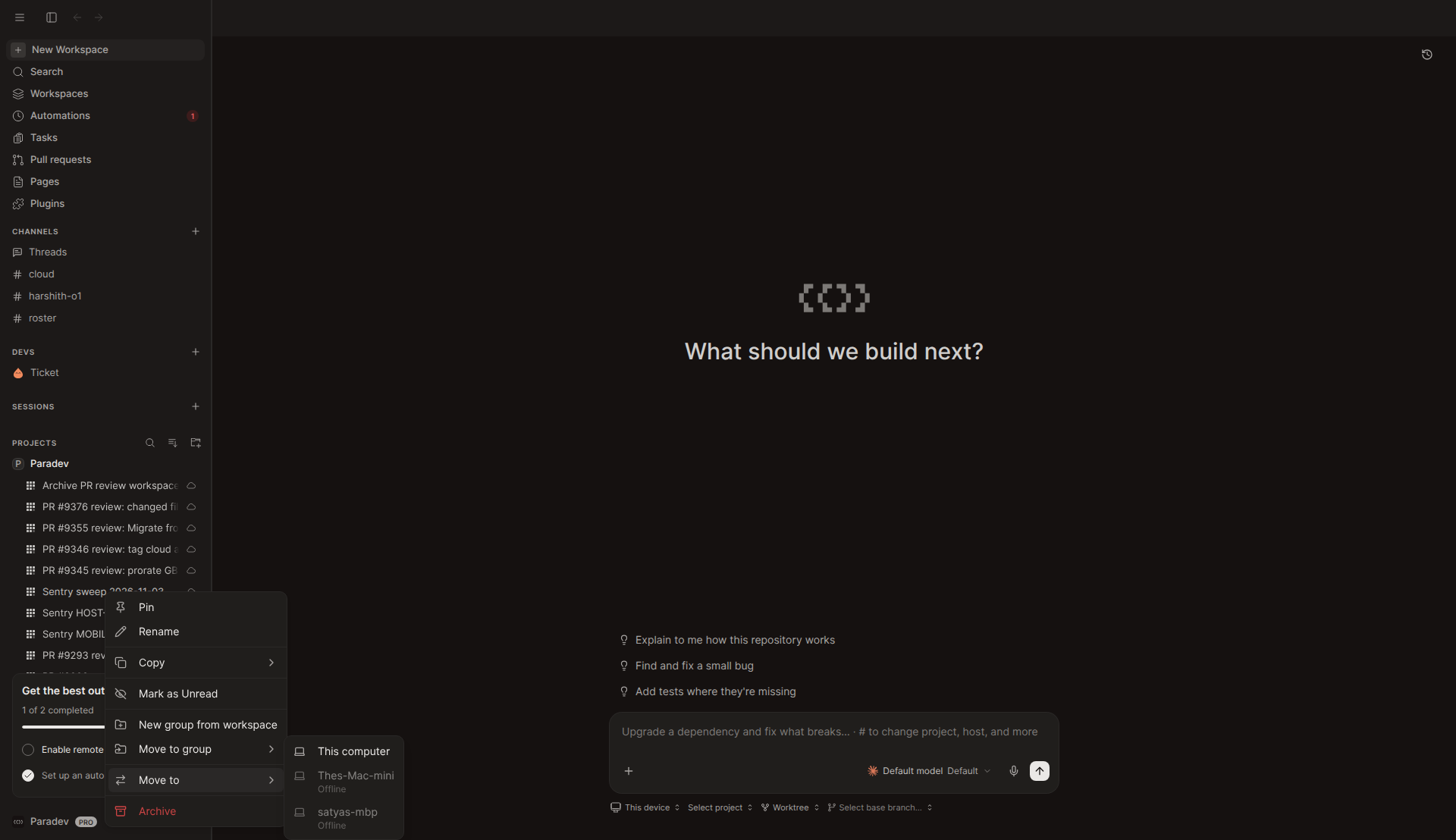
aria-disabled="true"). No Cloud entry, which is correct for a workspace that is already in the cloud. "Move to group" shows the new folder-symlink icon.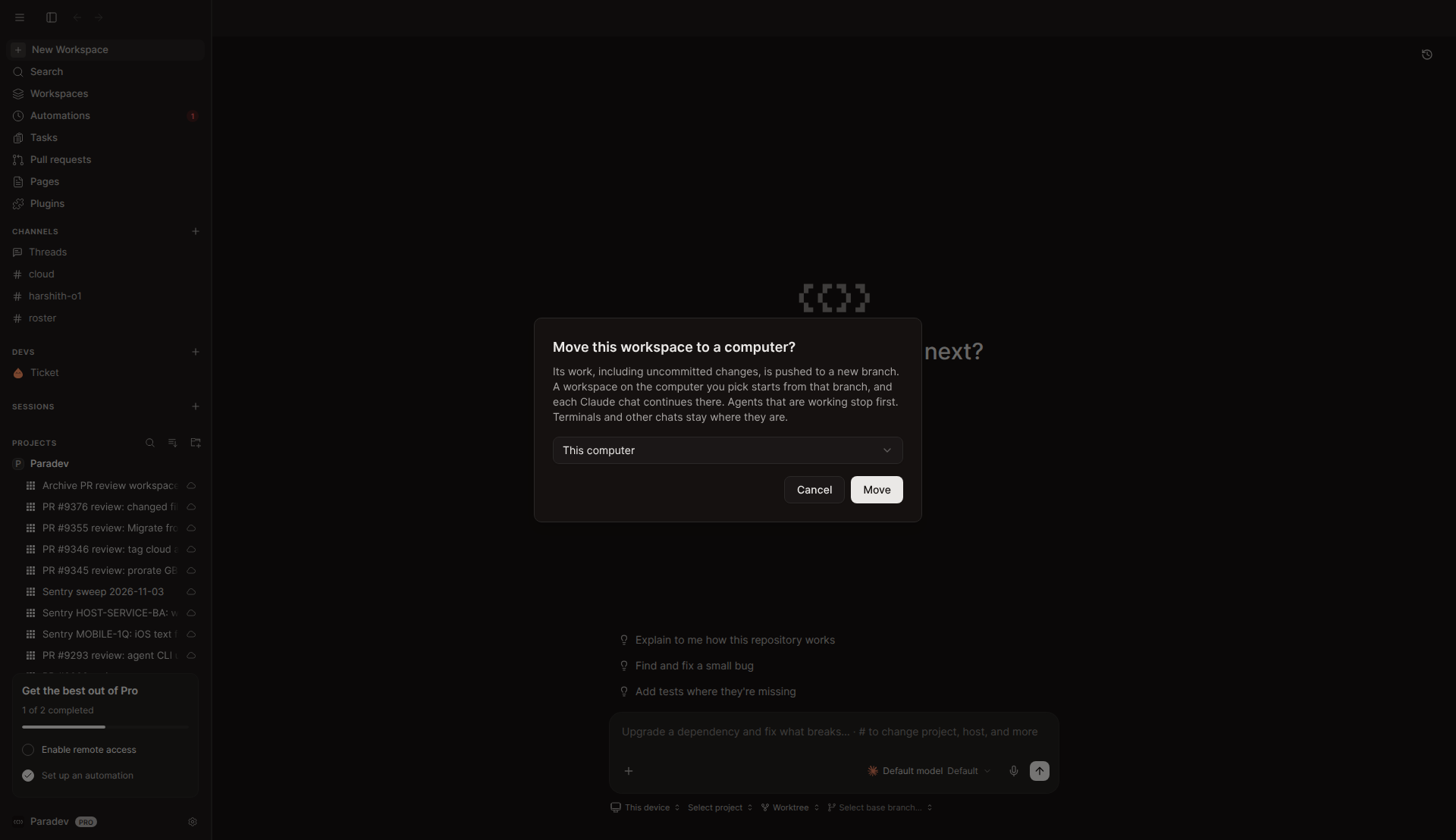
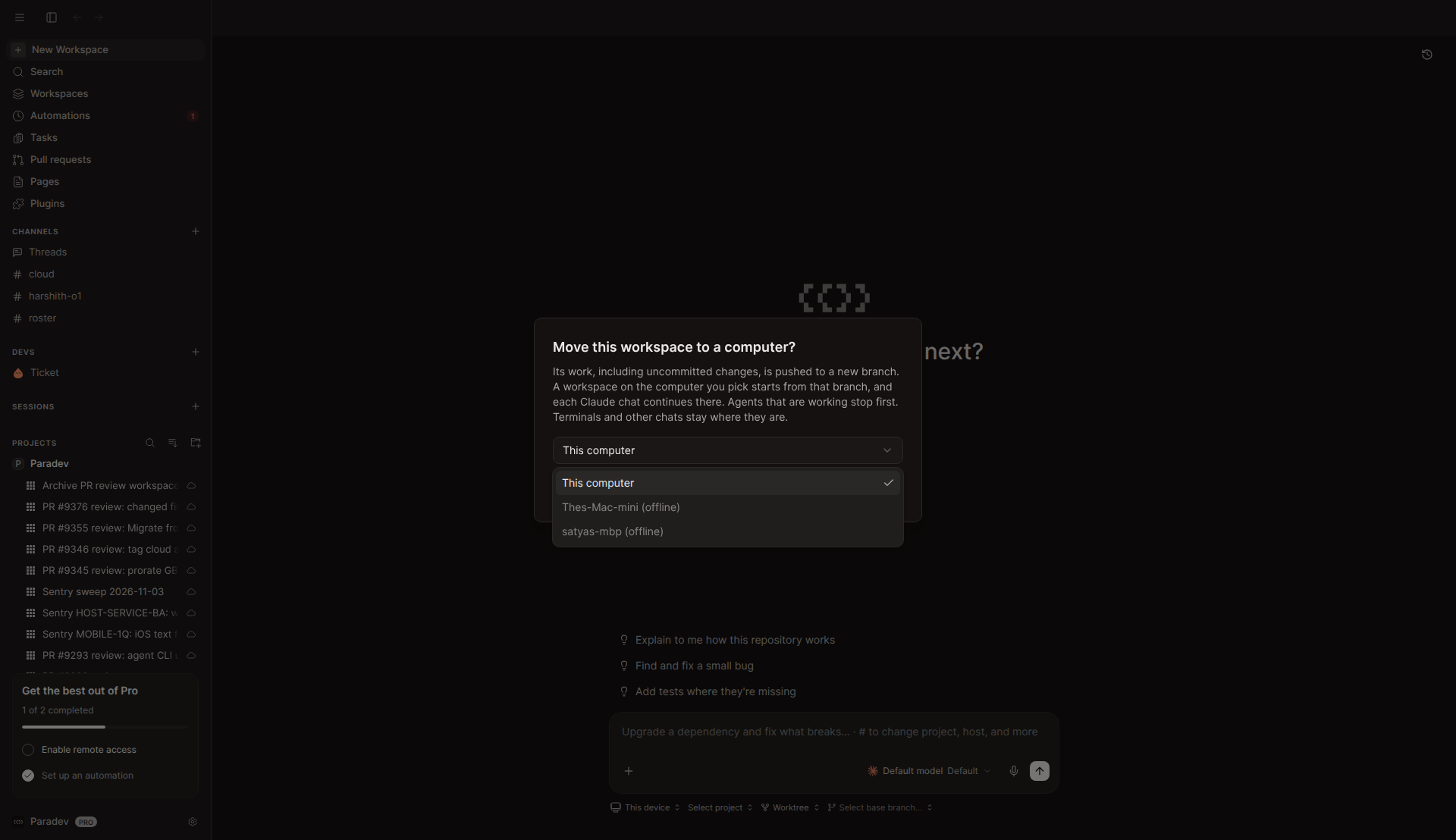
useMoveDestinationComputers.Not verified:
- Pre-selection of a different computer. Every other computer in the roster was offline, so the menu disabled them. "This computer" is also the dialog's default, so the screenshot above does not prove
initialHostIdon its own. The author reports this path working in their QA. - Cloud entry ("Cloud / New cloud workspace") — needs a workspace on this machine, and the dev sandbox had none.
- Bulk (multi-select) menu icon — not captured. The change is a one-line icon swap.
- Workspace header ⋯ menu — not changed by the PR. The cloud workspace page did not load in the sandbox, so I read it from source (see the first finding).
Questions for the author
- Should the workspace header's ⋯ menu (
WorkspaceMoreMenu) get the same submenu in this PR, or is that a planned follow-up for SUPER-3362? - For this computer, should the label be the host name or "This computer"? Right now the menu and the dialog disagree.
- When the only destination is the disabled "No other computer is set up for this account." row, should the "Move to" submenu be hidden instead of opening onto one disabled item?
Test / CI notes
- All at
73c45b1739fcb736277850ce5c01d2d0523499a2. bun testonDashboardSidebar,MoveWorkspaceDialogand_dashboard/hooks: 238 pass, 0 fail.apps/desktop bun run typecheck: pass.bun run check:i18n: pass, and the tree was still clean afterwards (the catalogs are complete for both new messages, "Move to" and "New cloud workspace").biome checkon the 8 changed TS/TSX files: clean.- GitHub checks at review time: CLA pass, CodeRabbit pass, cubic neutral. No build or test workflows had reported.
- I could not open the Linear ticket SUPER-3362 from this sandbox (Linear was not authenticated).